Cairn
A calm system of record for regulated work.
Cairn connects the procedure that should be followed, the record of carrying it out and the evidence that supports it, anchored to the client, case or asset it concerned. And it can show you that record exactly as it stood on any earlier day.
Read the transcript
What is Cairn? A calm system of record for regulated work.
Important work gets done. But when someone asks for proof, the evidence is scattered across email, folders, spreadsheets and notes.
Cairn connects three things: the procedure that should be followed, the record of carrying it out, and the evidence that supports it. All of it anchored to the client, case or asset it concerned.
It's built for compliance, operations and oversight teams who have to show, later, that the right process was followed. Starting with small regulated firms in financial services.
Author a procedure once: the steps, the guidance, and the evidence each step needs. Published versions are stable, so a record always keeps the version it was started under.
Start a record for a client. Work through the steps, record an outcome for each, and attach the evidence where it belongs.
Departing from the procedure is allowed, but never silent. The record says so, and says why. That's a better answer for an auditor than a suspiciously perfect checklist.
Every record stays connected to its subject, so the history builds up over the years and outlives any single review.
And you can view any record exactly as it stood on an earlier day. Not a reconstruction months later. The record, as it was.
Cairn doesn't assign work, automate decisions or chase people. It sits beside the tools you already have, as the record you reach for when someone asks.
Cairn. Early access launching soon.
The problem
The work was done. The proof is scattered.
When a regulator, auditor, board or client asks to see it, the evidence is spread across systems that were never designed to keep a record.
Email
Approvals and confirmations buried in threads.
Shared drives
Which version of the file was the final one?
Spreadsheets
A tick in a box, with nothing behind it.
Notes and calls
What was said, by whom, and when?
What Cairn is
One dependable home for the procedure, the record and the evidence.
Cairn sits beside the tools you already use. You work as you do now; Cairn is where the record and its evidence end up, in order, against the procedure that was in force at the time.
Procedure
What should happen: the steps, the guidance and the evidence each step needs.
Record
What did happen: one procedure version, one subject, step by step.
Evidence
What proves it: files, links, written assertions and attestations.
Subject
Who or what it concerned: a client, case, property or asset. Records accumulate against it over the years.
Your CRM knows who the client is. Cairn proves what process was followed for them.
How it works
Publish the procedure. Keep the record. Show it as it was.
The screens below show a fictional wealth manager working through an annual suitability review. Every name, firm and file is invented.
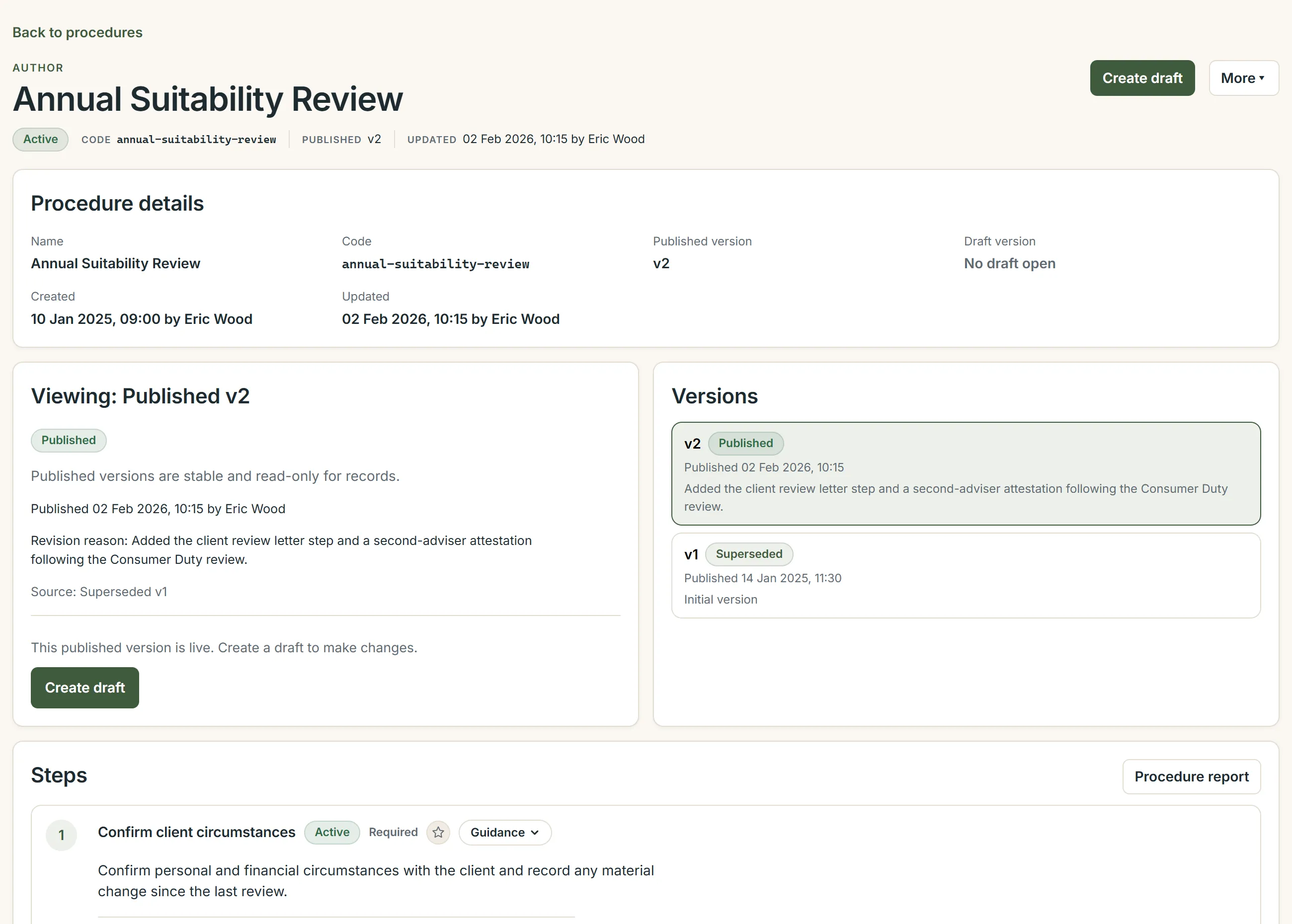
1 · Author
Publish the procedure once: the steps, the guidance and the evidence each step needs.
Steps carry a weight: required, expected or optional. Evidence slots name what's needed, down to an attestation by a second person.
Published versions are stable. A record keeps the version it started on, even after the procedure moves on. That applies on every plan, not as an upgrade.
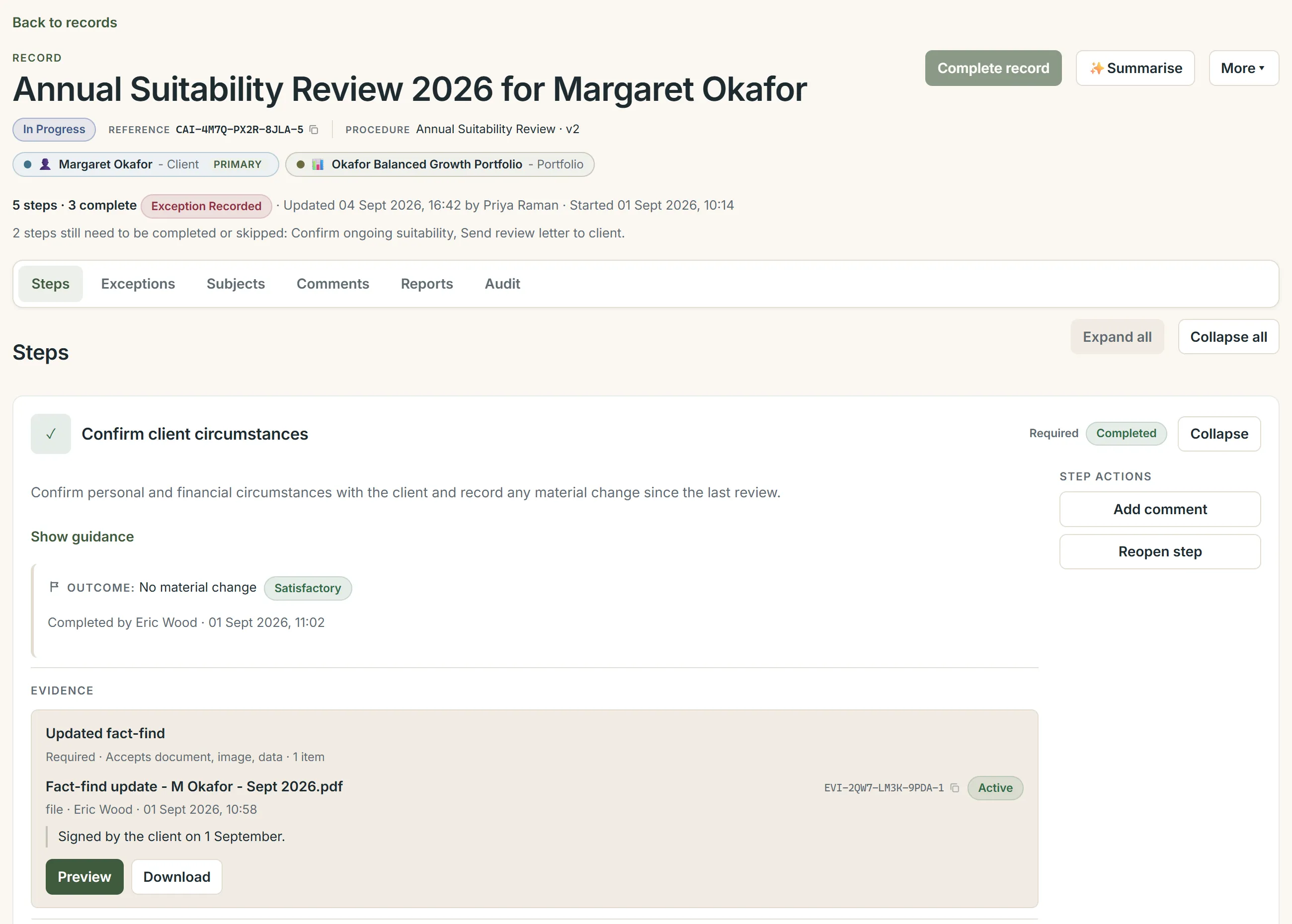
2 · Record
Start a record for a client. Complete the steps. Attach the evidence.
Each step records an outcome: satisfactory, adverse or inconclusive. Evidence stays with the step it belongs to, with a reference, a timestamp and who added it.
Steps can be done in any order. Subjects, comments, reports and the audit trail sit on the same page.
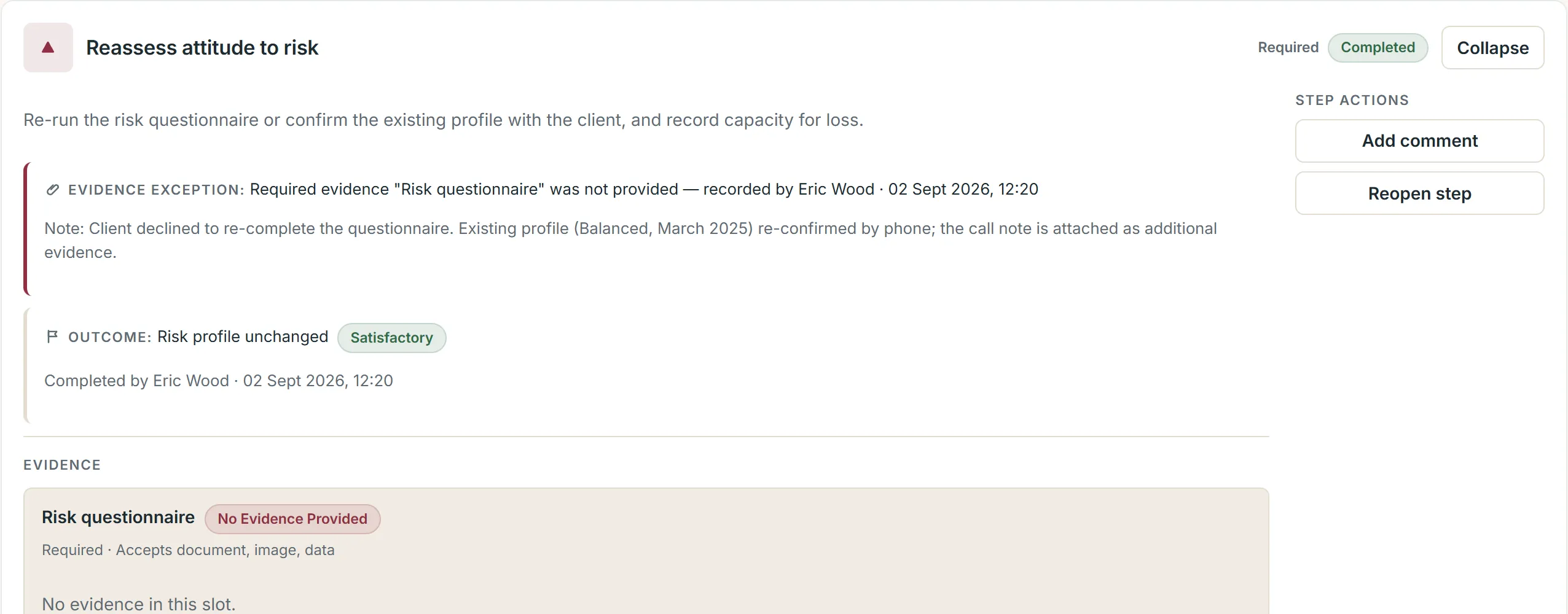
3 · Deviations
Depart from the procedure if you must. Never silently.
A step completed without its required evidence, or skipped, is recorded as an exception with a reason. Nothing is overwritten; corrections stay visible in the history. That's a better answer for an auditor than a suspiciously perfect checklist.
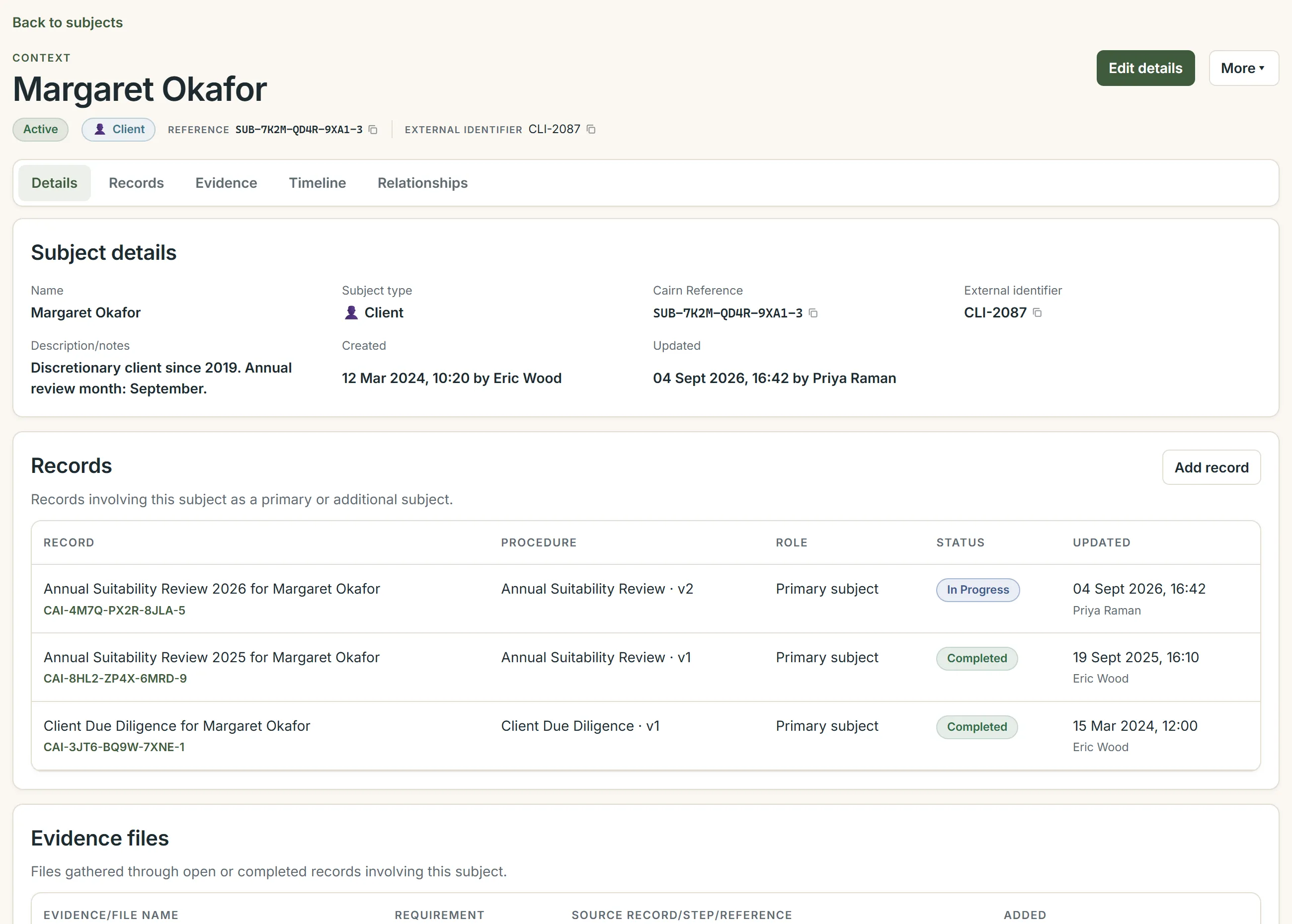
4 · Subjects
Every record stays connected to the client it concerned.
A subject is the client, case, property or asset a record is about. Its records, evidence and timeline build up over the years and outlive any single review.
Relationships link subjects to each other: a client to a trust, a portfolio to its owner. Subjects carry identity only; the data about them stays in the system that owns it.
5 · Point in time
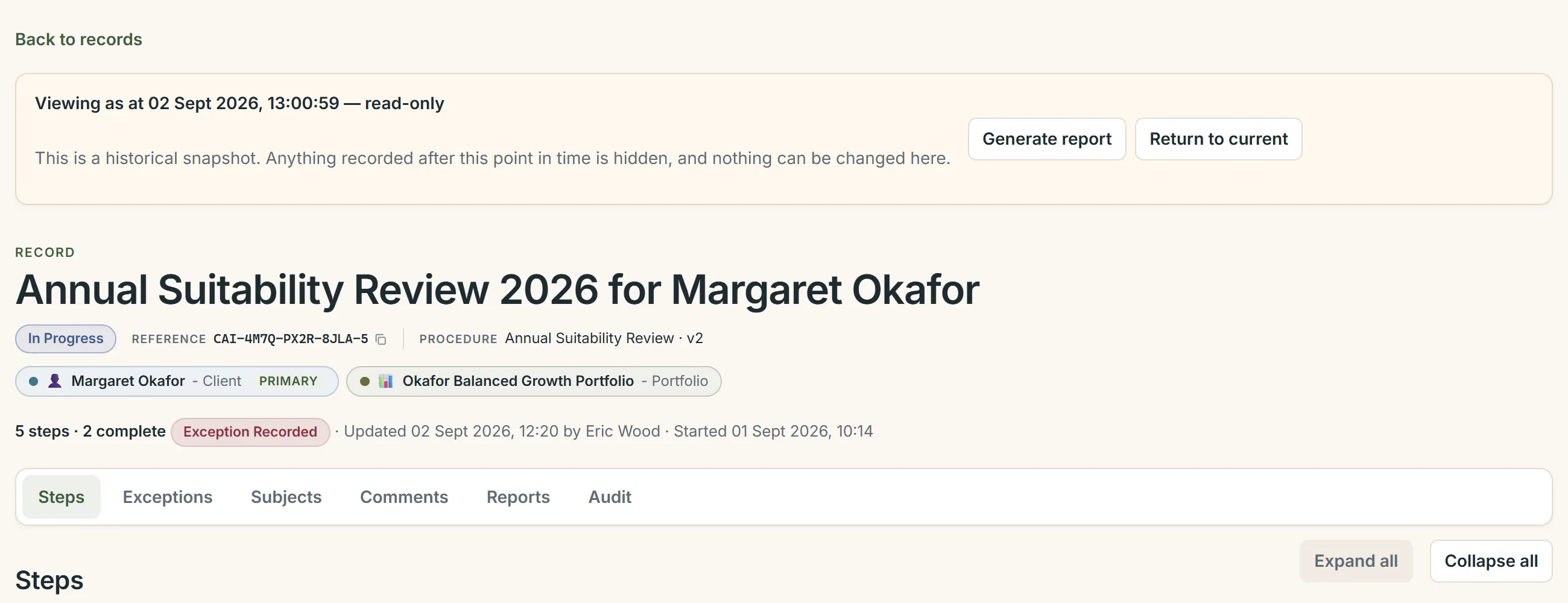
Show the record exactly as it stood on the day. Not a reconstruction.
History is append-only. Pick any earlier moment and Cairn replays the record as it was then: read-only, and ready to hand over as a PDF report. Your procedure can change; your record of what the procedure said cannot.
6 · Audit trail
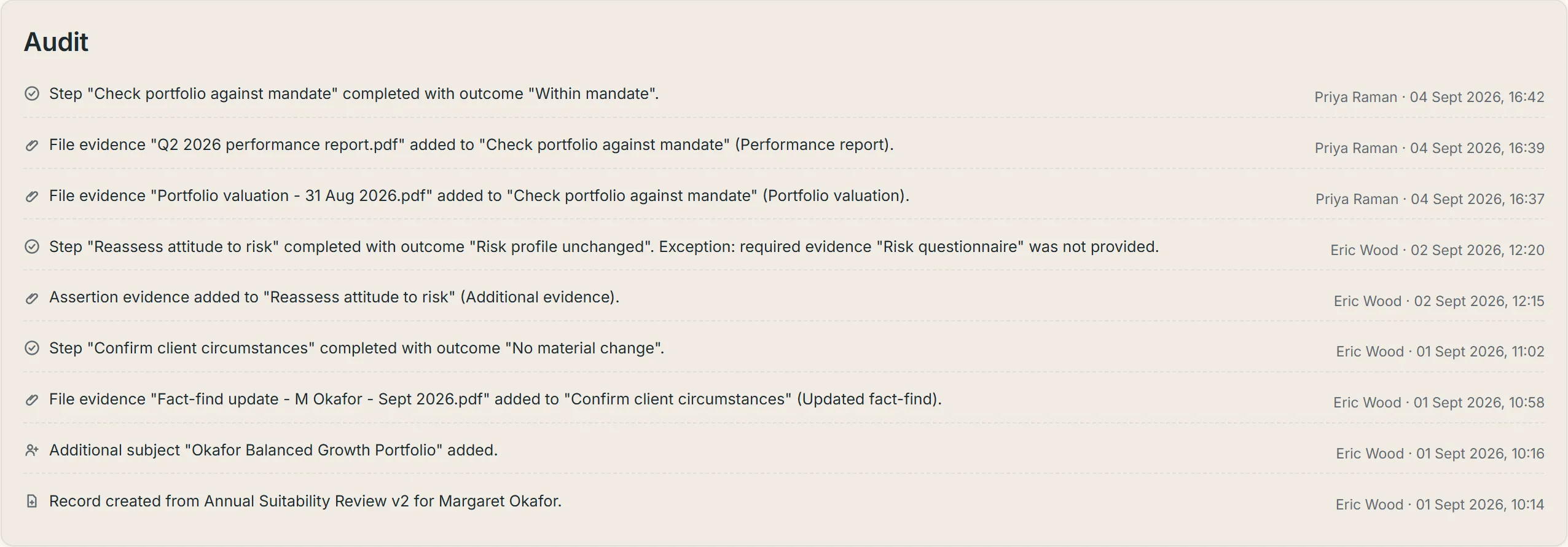
Every change, in order, with who and when.
Nothing is silently edited. Reopening a step, voiding a piece of evidence or correcting a mistake is itself part of the record, with its own timestamp and reason.
7 · Records
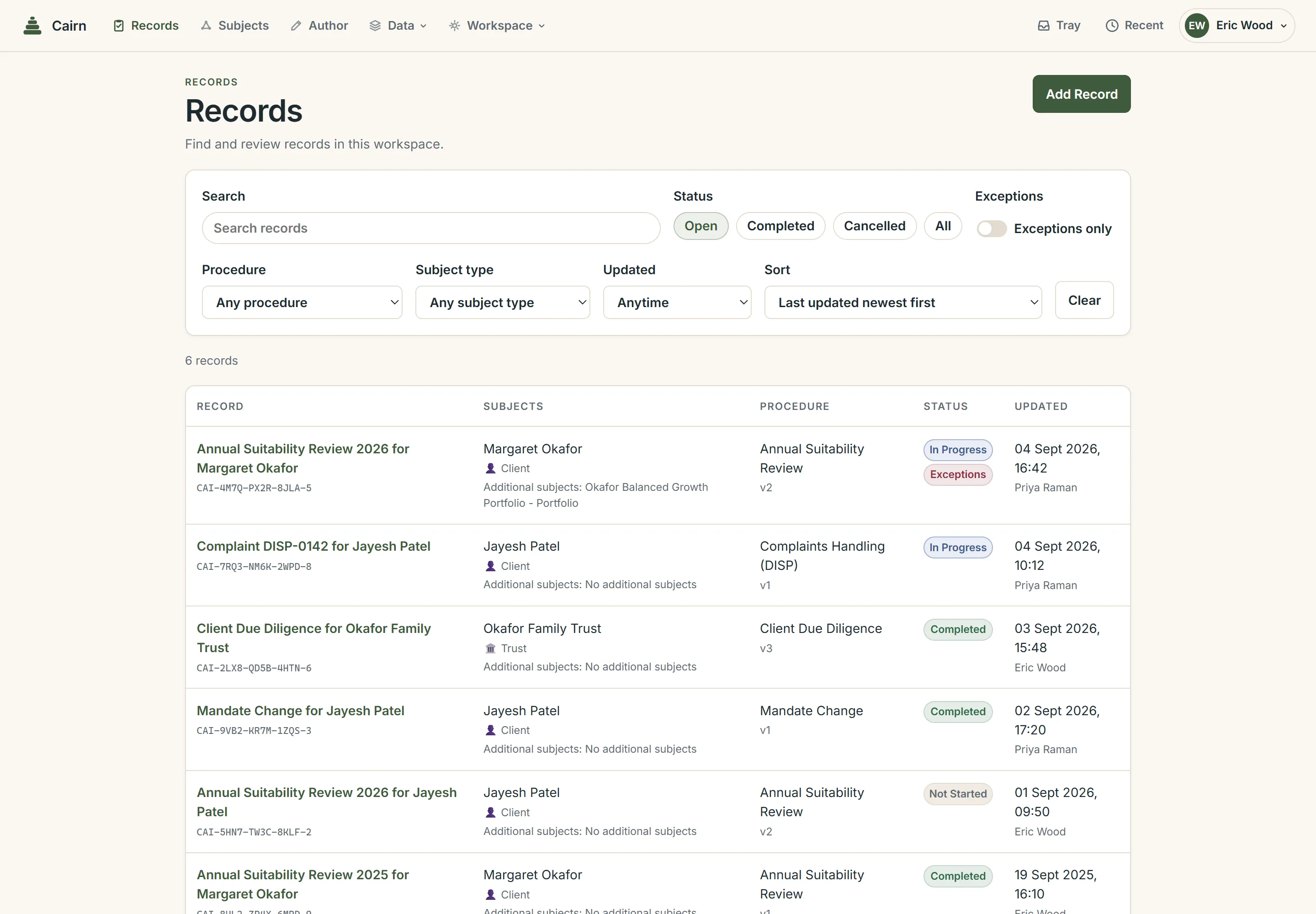
Find the record when someone asks.
Filter by procedure, subject type, status or date, or show only the records carrying an exception. Reports are generated PDFs you can keep, and CSV export takes your data with you.
What makes it different
Everyone else records that a checklist was completed.
Cairn records what it was about, and keeps it after the checklist is gone.
Subjects that outlive any one record
Records accumulate against the client, case or asset they concern, so the history is there years later.
Version-bound records on every plan
Every record uses a specific published procedure version. You can always see which one was followed.
Deviations, visible and explained
When work departs from the procedure the record says so, and why. Corrections never overwrite history.
Any record, as at any date
See the record exactly as it stood on an earlier day and hand it over as a report.
No workflow engine to configure
No routing rules, overdue queues or implementation project. Cairn is adopted, not implemented.
Everyone can have a login
Pricing is per workspace, not per user. The people doing the work never cost extra.
Who it's for
Teams who need to show, later, that the right process was followed.
Answering to a regulator, an auditor, a board, a client or an internal review. Teams that already know how to organise their work but struggle to preserve consistent, defensible proof. We are starting with small regulated firms: wealth managers, IFAs and professional services, where the pressure is loudest today. The shape of the problem isn't specific to finance.
Compliance and oversight
Own the procedure, field the questions, and need the file to be complete on the day it's asked for.
Operations and advisers
Do the reviews, checks and sign-offs, and get asked “where's the proof?” months later.
Getting started
Adopted, not implemented.
Cairn is self-serve. There are no setup fees, no onboarding projects and no consultancy. If a procedure can't be used without help, we treat the product as incomplete.
Start from a starter pack
Begin from a curated set of procedures, subject types and relationships for your sector, then edit them to match how you actually work.
- Wealth, DFM and IFA
- Professional services
- Legal practice
- Property management
- Schools and education
- Medical and dental
- Hospitality
- HR
- Finance and accounting
- Marketing
- Customer support
Your data stays yours
CSV import to bring subjects in. CSV export and PDF reports to take the record out. No extra charge for leaving with your data.
Files handled carefully
Evidence files are encrypted at rest and scanned for malware. Cairn never stores your password; sign-in is handled by a specialist identity provider.
AI that never decides
Cairn can summarise a record for you, from facts selected by code, so you can check it against the source. It never determines an outcome, completes a step, attaches evidence or judges whether you're compliant. People do.
What it isn't
Cairn doesn't run your work. It records it.
Keep the systems that run your work. Cairn is the record beside them.
Not a workflow engine
No routing, reminders, escalation or automation. The system waits for you. It does not chase you.
Not a CRM or document store
It records what happened across them. Subjects hold identity, not your client data.
Not a compliance verdict
Cairn never decides whether you're compliant. It shows what was done, by whom, and why.
Not enterprise software
No procurement cycle, no public API or webhooks, no custom features. Too regulated for spreadsheets, too calm for platforms.
We would rather tell you now than three months in. If you need task assignment, branching approvals, extensive integrations, or an AI agent that completes the work for you, other tools are a better fit and we would rather you used them.
Pricing
Clear, per workspace, and on this page.
You pay per workspace, not per user. Every plan is the same product: version-bound records, full history and the complete audit trail on the smallest plan and the largest. No “contact sales”, no custom quotes.
Free during early access
Early access is free to use until the official launch in early 2027. No date is fixed yet.
Early adopters pay half
Teams that join during early access get 50% off for their first year after launch.
Team
For a small team getting its records in order.
TBC / month, per workspace
- Up to 5 users
- Up to 5 active procedures
- 25 GB of evidence storage
Growth
For firms where everyone should have a login.
TBC / month, per workspace
- Users and procedures without practical limits
- 150 GB of evidence storage
- Same product, same history, same audit trail
Plan prices are not fixed yet and will be published here before launch. Storage beyond the included amount is priced honestly per gigabyte. There is no limit on subjects, records, evidence or comments: you should never hesitate to write something down because of what it might cost.
Early access
Be among the first firms on Cairn.
Leave your work email and we will send a short note when your early-access workspace is ready. Or write to [email protected].
About Cairn River
A small UK software company, building for the long term.
Cairn River is a small UK-based software company. We are building Cairn deliberately, and we plan to be doing it for a long time. We are not venture-backed and have no plans to be. We answer our own support email: [email protected].